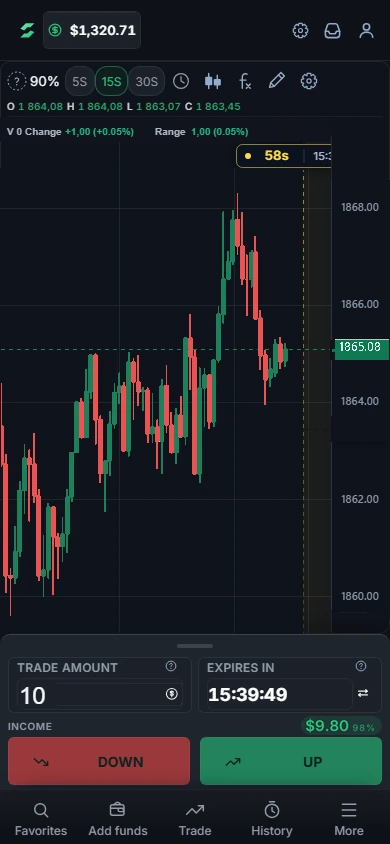
DEXOPT / Mobile platform

Mobile platform

Trade Options and Futures in your phone’s browser or as a Telegram Mini App.

Interface / Options

Two ways to trade on your phone

Phone browser

Open the site in Safari, Chrome or another modern mobile browser. There is nothing to download.

Sign in with an email, Google or a wallet, or start the demo

iOS · Safari
  1. Open dexopt.app in your phone’s browser
  2. Share
  3. Add the page to your home screen for one-tap access
Android · Chrome
  1. Open dexopt.app in your phone’s browser
  2. More
  3. Add the page to your home screen for one-tap access

Telegram Mini App

Open DEXOPT inside Telegram without an app store or installation. The Mini App runs the same terminal as the website.

  • Opens straight into the trading room
  • Telegram’s header and background follow the light or dark theme
  • The layout fits Telegram’s screen, including notches and Telegram’s own header
  • Telegram’s Back button moves between screens
Official channels · Telegram

Help Center

Do you have an iOS or Android app?

DEXOPT runs in your phone’s browser and as a Telegram Mini App, so there is nothing to download from an app store. Both open the same terminal: trades, deposits, withdrawals and full charts.

Help Center

Which browsers and devices are supported?

The platform runs in any modern browser — Chrome, Firefox, Safari, Edge, or Brave — on desktop, tablet, and phone. No download or plugin is required; keeping your browser up to date is enough.

Help Center

Options

Choose a direction and expiry; check the payout before trading.

The full terminal, adapted for touch

Chart

Pinch to zoom, drag to move and open secondary controls from the More menu.

Indicators

Indicators (72) and drawing tools (39), each with a guide.

Deposit and withdrawal

Add funds, withdraw and review your transaction history from your phone.

Theme

Light and dark themes in the browser and inside Telegram.

FAQ

Security

Use two-factor authentication, review active sessions and verify the exact address before signing in or transferring funds. Never share a password, recovery phrase or one-time code with support.

Learn

Loading